markdown-review

Markdown Review



An IntelliJ IDEA plugin for reviewing changes to Markdown files in rendered form instead of as raw text.
Documentation: https://agadek.github.io/markdown-review/
Why
A text diff of Markdown shows syntax instead of content: a rewritten paragraph becomes a few red and green lines,
a change in a table becomes shifted | characters, and re-indenting a list looks like everything changed.
Markdown Review shows the same comparison the way the document looks once rendered, so the reviewer judges the
content, not the markup. The plugin does not open a window of its own: it adds new viewers to IntelliJ’s regular
diff window, so it works wherever the IDE shows a diff of an .md file.
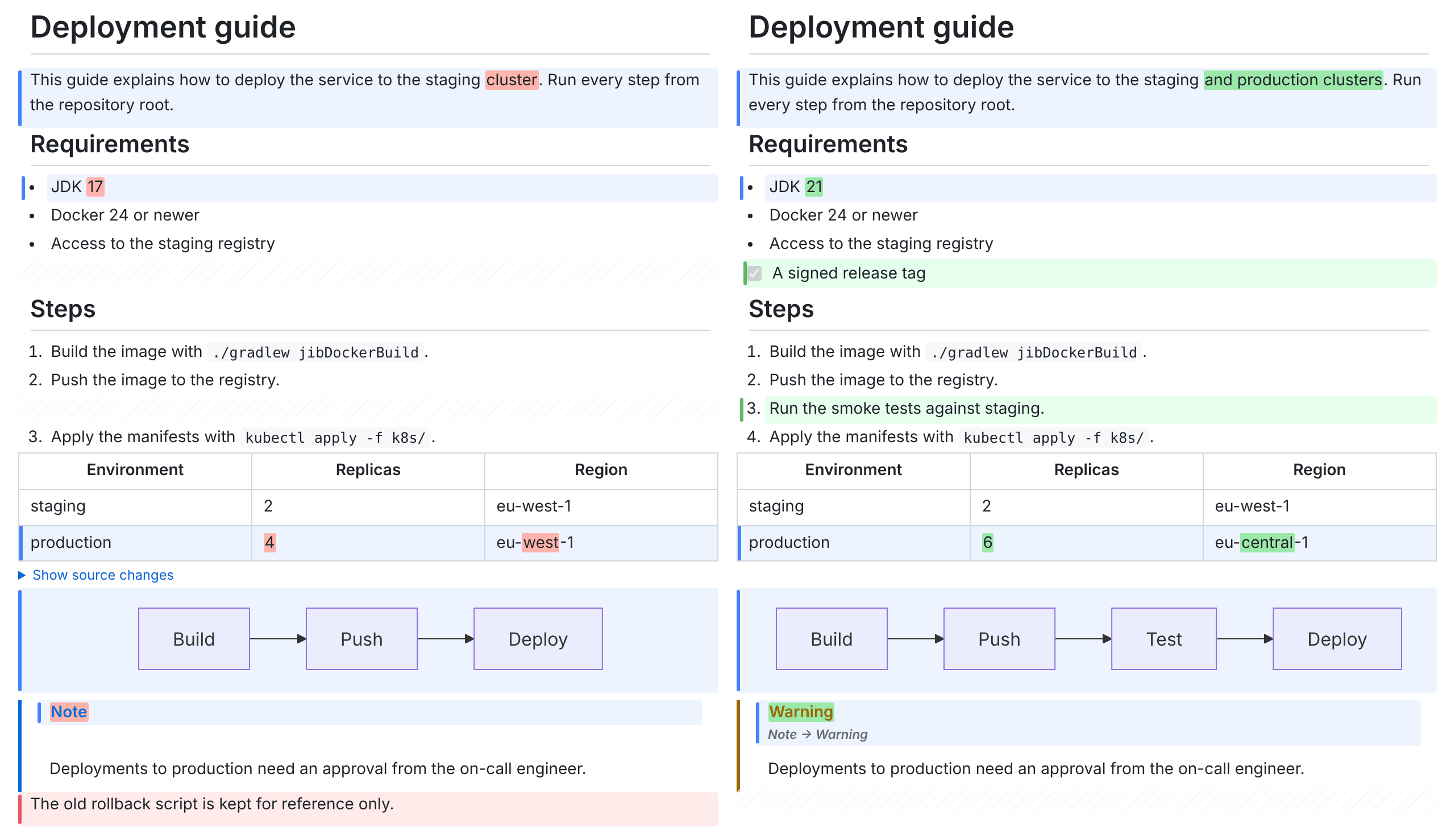
What the plugin does
- Rendered side-by-side diff. The left and right versions are rendered in two columns, with blocks (headings, paragraphs, list items, table rows, code blocks) aligned in rows. Removed blocks have a red background, added ones a green background, and the other side keeps an empty placeholder of the same height. Inside changed blocks, individual words are highlighted.
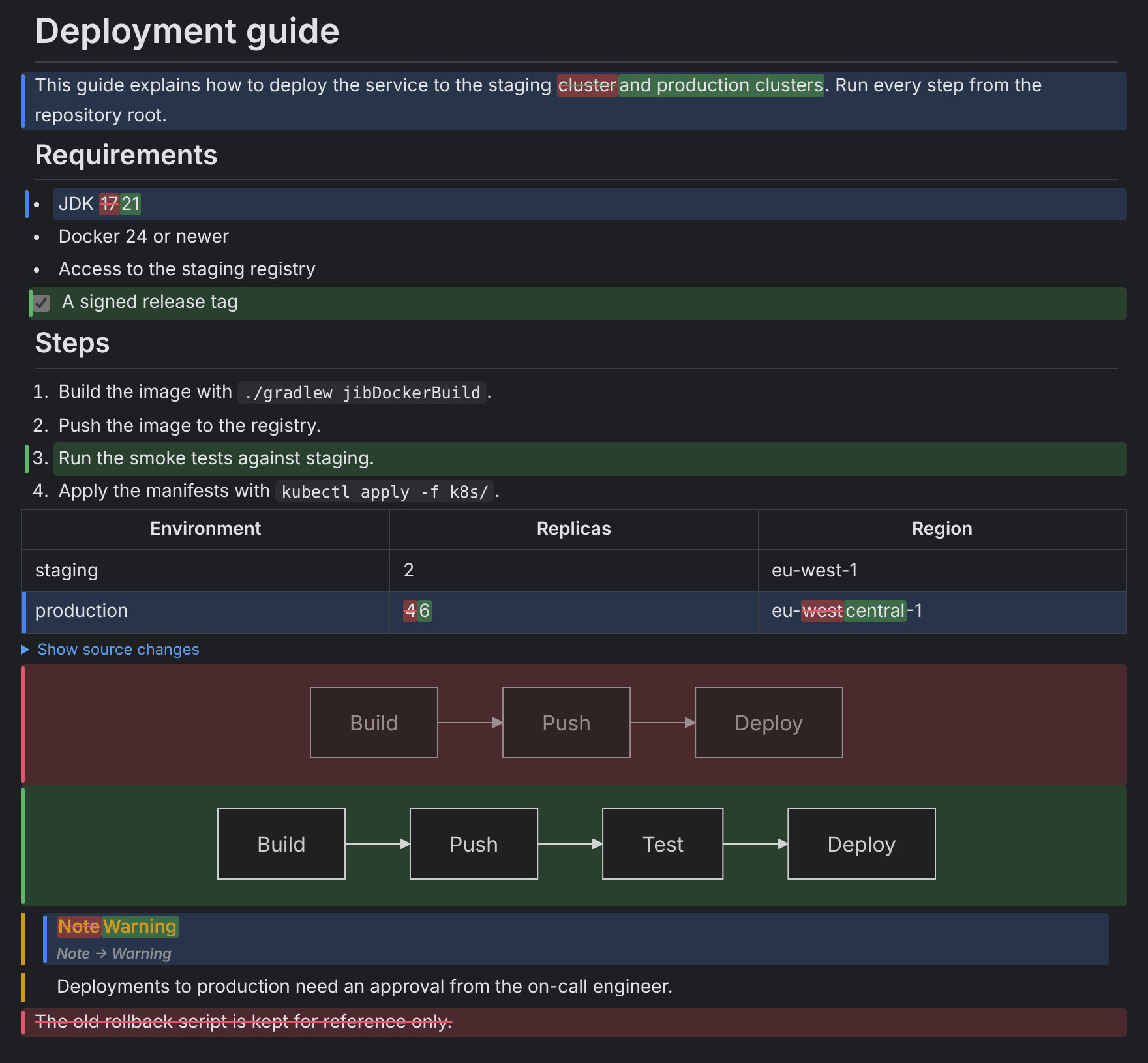
- Merged view. One column: removed parts red and struck through, added parts green. Handy for reading a large change quickly.
- Mermaid diagrams. ` ```mermaid ` blocks are drawn as diagrams, offline, in the editor’s light or dark theme. A changed diagram shows the old and the new drawing side by side, with a “Show source changes” toggle for the line diff of its source. A diagram that does not parse shows Mermaid’s error and its source.
- Math.
$...$and$$...$$formulas are drawn with KaTeX, offline. A changed formula is highlighted as a whole, and a changed block formula has the same “Show source changes” toggle. A formula that does not parse keeps its source, marked with KaTeX’s error. - Moved blocks. A paragraph, heading or list item that moved without changes is labeled at both ends (“Moved down”, “Moved here from above”), with a link to the other end, instead of reading as a deletion and an addition. Reverting it moves it back.
- Text diff. IntelliJ’s built-in diff is always one click away in the diff window’s viewer switcher.
- Per-block revert and apply. Buttons on a changed block copy it to the other side, like the arrows in the text diff. They appear only on a side that can be edited (a local file, not a VCS revision), and each click goes through the IDE document as one Undo step.
- Block source editing. Double-click a block on a side that can be edited to change its raw Markdown in place; Ctrl/Cmd+Enter saves it as one Undo step, Esc cancels. The view waits with re-rendering while you type.
The viewers work in the Commit window (Show Diff, Ctrl+D), in file history, when comparing with a branch and in pull request windows. Compare any two files with Compare Markdown Files… from the project view context menu or the Tools menu. F7 and Shift+F7 move between changes; Ctrl/Cmd+click on a block opens its source in the editor.
Show Rendered Diff in the context menu of a Git log commit’s changed files, of file history and of the Commit window opens the selected Markdown changes in the rendered viewer, even when diffs open with the text viewer by default.
Right-click a block for Go to Source, Open in Text Diff Here and Show History for This Block. Open in Text Diff Here switches the window to the text viewer at the block’s line; in a pull request window, that is where the comment gutter starts a review comment on the block. Show History for This Block lists only the commits that changed the block’s lines, for a file under version control.
Settings | Tools | Markdown Review picks the viewer a Markdown diff opens with (rendered side by side, rendered merged, or text) and holds the whitespace, collapse, pairing threshold, large-file, remote-image, Mermaid and math options. The colors of added, removed and modified blocks and of changed words are set per color scheme in Settings | Editor | Color Scheme | Markdown Review; a color left unset follows the scheme’s Diff colors. A custom stylesheet (a CSS file on the same settings page) can restyle the rendered view, for example to match a documentation site, and the Export button on the viewer’s toolbar saves the rendered diff as a standalone HTML file or a PDF.
Supported Markdown: CommonMark with GitHub Flavored Markdown (tables, task lists, strikethrough, autolinks,
footnotes, alerts), HTML blocks and inline HTML (sanitized), <details>, HTML comments, hard line breaks, emoji
shortcodes, wiki links ([[page]], [[page|label]]), YAML front matter, Mermaid and math. The user interface is in English.
Status: 1.0. What the plugin does and does not do is described in docs/SPECIFICATION.md, what comes next in docs/PHASE3.md, and releases in docs/RELEASING.md. The contract between the diff engine and the IDE layer is described in docs/ENGINE_CONTRACT.md. The screenshots are rendered from docs/screenshots/sample-old.md and sample-new.md.
Requirements
IntelliJ IDEA (Community or Ultimate) 2025.1 or newer with JCEF support (the default in JetBrains Runtime). Without JCEF the plugin stays out of the way: the diff window keeps the text viewer.
Building
./gradlew buildPlugin
./gradlew runIde
./gradlew test
./gradlew test runs the engine tests and the IDE integration tests (BasePlatformTestCase, headless).
Development
Developed with the help of Claude Code, with every change reviewed by the maintainer. Contributions are welcome: see CONTRIBUTING.md, and CHANGELOG.md for what changed in each release.
Reporting problems
Open an issue with the bug report template. The most useful part is a small pair of Markdown files (old and new) that shows the problem: every confirmed bug gets one as a test fixture before it is fixed. When the plugin throws an exception, the IDE’s error dialog offers Report to Markdown Review on GitHub, which opens a prefilled issue in the browser; nothing is sent until you submit it there.
Support
Markdown Review is free for noncommercial use and maintained in spare time. It is developed with the help of Claude Code, and sponsorships help cover the AI token budget that goes into new features and fixes. If the plugin saves you time in reviews, you can chip in through GitHub Sponsors or Ko-fi. Companies get a lifetime commercial license for $1 per user through GitHub Sponsors; see Commercial use.
License
The plugin bundles Mermaid 11.17.2 and KaTeX 0.18.11 (both MIT License); see THIRD_PARTY_NOTICES.md.
PolyForm Noncommercial License 1.0.0. Noncommercial use (personal, educational, research, nonprofit organizations) is allowed free of charge.
Commercial use
Using the plugin for work at a company needs a commercial license, which comes with the one-time Commercial license tier on GitHub Sponsors. In short:
- It costs US$1 per user, paid once: pay $25 for 25 people who use the plugin.
- It lasts for life and covers all future versions.
- The plugin has no license key or check.
The full terms are in docs/COMMERCIAL_LICENSE.md.